
Authentication and Authorization
You'll need to authenticate your requests to access any of the endpoints in the Babele API. In this guide, we'll look at how authentication works.
Bearer token authentication
The Babele API is not meant for other clients consuming it other than our frontend application. For this reason, the authentication method is protected by Captcha, so it cannot be used directly by other clients.
Therefore, in order to get your authentication token, you need to use the Babele frontend application and login there. Once you are logged in, open the browser console (in Chrome it's F12 or right click -> Inspect, the select the Console tab) and run the following command:
Script for getting the auth token
'Bearer ' +
  JSON.parse(localStorage.getItem('persist:babele/1.0.5/session')).bearer.slice(
    1,
    -1,
  )
This should give you a result that looks like this:
'Bearer eyJhbGfwegw3zavfwg3kpXVCJ9.eyJTdWJqZWN0IjoiMzJmYTgxMGItYWJkNi00Mjgfwg342t23vsgwR0cDovL3NjaGVtYXMueG1sc29hcC5vcmcvd3MvMjAwNS8wNS9pZGVudGl0eS9jbGFpbXMvc2lkIjoiNDBhYjM1YTktMjM3YS00ZjExLWE2Y2MtNDM3ZjA0Y2M4YmExIiwidXBuIjoiMTUiLCJodHRwOi8vYmFiZWxlLmNvL2NsYWltcy9wbGF0Zm9ybWFkbWluY2xhaW0iOiJUcnVlIiwiaHR0cDovL2JFfwegwgqzvbG9naW5yZXF1aXJlZCI6IkZhbHNlIiwibmJmIjoxNzQzMjYzOTI2LCJleHAiOjE3NDM4Njg3MjYsImlhdCI6MTc0MzI2MzkyNn0.NKHmovY-2TcGieFmExQrrigDbR3p-bVahSH_mfb7Dv4'
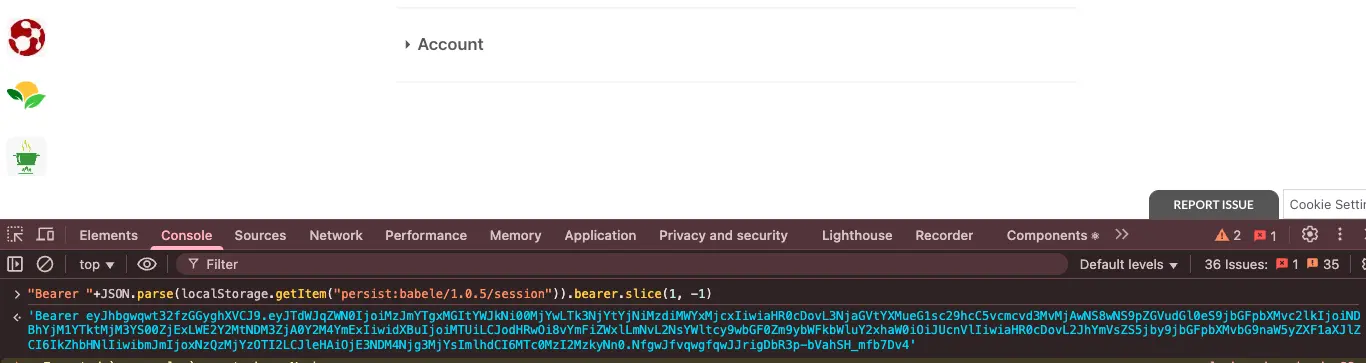
You can use this token to authenticate your requests to the Babele API. Just include it in the Authorization header of your requests like this:
curl -X POST https://api.babele.co/api/ApplicationDefinition/999/Applications \
 -H "Authorization: Bearer eyJhbGcgwgwe7gfwgwZZVCJ9.eyJTdWJqZWN0IjoiN2ZkMjc4YmUtMzA1Zi00ZWExLWJmODItNTQ5Yjg0NDBiM2E5IiwiaHR0cDovL3NjaGVtYXMueG1sc29hcC5vcmcvd3MvMjAwNS8wNS9pZGVudGl0eS9jbGFpbXMvc2lkIjoiYjE5ZDE0NWYtZDZiZC00Y2U5LTljYTQtYjFlOTgzNmRhODlhIiwidXBuIjoiNDAxMTQ0IiwiaHR0cDovL2JhYmVsZS5jby9jbGFpbXMvcGxhdGZvcm1hZG1pbmNsYWltIjoiRmFsc2UiLCJodHRwOi8vYmFiZWxlLmNvL2NsYWltcy9sb2dpbnJlcXFWFWGFQFsc2UiLCJuYmYiOjE3NDMyNjA0MDcsImV4cCI6MTc0Mzg2NTIwNywiaWF0IjoxNzQzMjYwNDA3fQ.K34301vGXSvFQC-5ypvDbfEr-L-uX57zw6GBjNa3sT4" \
 -H "Content-Type: application/json" \
 -d '{"skip":50,"take":50,"orderBy":0}'
Authorization
The Babele API uses role-based access control (RBAC) to manage permissions. Each user has a set of roles that determine what actions they can perform and what resources they can access. The roles are defined in the Babele platform and are assigned to users based on their membership in communities or projects. For many of the endpoints in this documentation, you will need to be a admin user to have the permissions to access them.